Email: info@touchsh.com
User

Industrial Tablet PC Buying Guide: 3 Key Metrics — CPU, Display, and I/O
2026-09-22 15:06:14
174
Industrial Tablet PC Buying Guide: 3 Key Metrics — CPU, Display, and I/O
[Shanghai, China — September 22, 2026] — Walk into any industrial PC catalog and you'll face a wall of specifications: processor models, clock speeds, screen sizes, resolutions, port counts, memory, storage. It's easy to get lost in the numbers — and easy to over-specify (wasting budget) or under-specify (causing failures).
The truth is, selecting an industrial tablet PC comes down to three key metrics: CPU, display, and I/O. Get these right, and the rest (memory, storage, OS) falls into place. This guide breaks down each metric so you can choose wisely.
Metric 1: CPU — Match to Your Software, Not the Spec Sheet
The CPU is the heart of any industrial tablet PC — but more GHz doesn't always mean better. The right CPU depends on your software ecosystem and performance needs.
ARM vs. x86: The Fundamental Choice
| ARM | x86 (Intel) | |
|---|---|---|
| Power consumption | Low (5–15W) | Higher (10–35W) |
| Cooling | Easy (fanless) | More heat (may need fan or larger heatsink) |
| OS support | Android, Linux | Windows, Linux |
| Boot time | Fast (5–10 sec) | Slower (30–60 sec) |
| Software | Android apps, custom Linux apps | Full Windows software, SCADA/HMI, .NET |
| Cost | Lower | Higher |
| Best for | Dedicated HMI, kiosks, data terminals, Android/Linux apps | Legacy Windows software, complex multi-tasking, IT integration |
Rule of thumb:
- If you run Windows-based SCADA/HMI software (Wonderware, Ignition, WinCC) or need .NET/Windows compatibility → choose x86/Intel
- If you run a dedicated HMI application on Android or Linux, need fast boot and low power → choose ARM
- If you need both → look for dual-system (Windows + Android) support on one x86 platform
Key CPU Considerations
- Core count & clock speed — More cores help with multi-tasking; higher clock helps with single-threaded performance. For most HMI applications, 4 cores @ 1.5–2.0GHz is plenty. Don't pay for 8 cores if you're running a single HMI app.
- TDP (Thermal Design Power) — Lower TDP = less heat = easier fanless cooling. In industrial environments, a 10W CPU that runs cool is often better than a 35W CPU that needs a fan (which can fail).
- Long-term supply — Industrial equipment has a 7–10 year service life. Choose a CPU with guaranteed long-term availability. Consumer CPUs are discontinued in 1–2 years; industrial embedded CPUs are available for 7+ years.
- Integrated graphics — For HMI applications, integrated graphics are sufficient. Discrete GPUs add heat, cost, and failure points — only needed for heavy visualization or video processing.
Common CPU Pitfall
Choosing based on GHz alone. A 2.0GHz ARM processor may outperform a 1.5GHz x86 for Android applications — and run cooler. Compare within the same architecture, and always match the CPU to your software.
Metric 2: Display — Size, Brightness, Touch, and Bonding
The display is what operators interact with every day. A poor display causes errors, frustration, and even safety issues.
Screen Size: Match to Application
| Size | Best For |
|---|---|
| 7"–10.1" | Compact machine HMI, handheld, small equipment, simple interfaces |
| 12"–15.6" | Standard machine HMI, data entry, MES terminals, moderate complexity |
| 17"–21.5" | Production monitoring, control rooms, complex HMI, dashboards |
| 24"–27" | Factory dashboards, Andon systems, large control rooms, high visibility |
Consider viewing distance: A 15" screen at arm's length is fine; a 15" screen across a 5-meter production line is unreadable. For distant viewing, go larger (21.5"+) and higher brightness.
Brightness: Don't Ignore This
- 250–350 nits: Standard indoor, controlled lighting (control rooms, air-conditioned factories)
- 500–800 nits: Bright indoor, near windows, warehouses with skylights
- 1000–1500 nits: Sunlight-readable — outdoor, direct sun, very bright environments
- 1500+ nits: Extreme outdoor (desert, high altitude)
Common mistake: Buying a 350-nit display for an outdoor or sun-facing installation. It will be unreadable. Always measure the actual ambient light where the display will be mounted.
Touch Technology
| Capacitive (PCAP) | Resistive | |
|---|---|---|
| Touch points | 10-point multi-touch | Single (rarely 2-point) |
| Gloves | Thin–medium (enhanced controllers) | Any thickness (pressure-activated) |
| Wet hands | Yes (with water-rejection algorithms) | Yes (immune to water) |
| Stylus | Capacitive stylus only | Any object (pencil, fingernail) |
| Surface hardness | 7H+ (glass) | 2–3H (film) |
| Clarity | High (glass) | Lower (film + air gap) |
| Durability | Excellent | Fair (film scratches) |
| Best for | Modern HMI, gestures, gloved operators | Very thick gloves, extreme water/oil, stylus/signature |
For most modern industrial HMI, capacitive (PCAP) is the right choice. Choose resistive only for very thick gloves (welding, foundry), extreme water/oil environments, or stylus-required applications.
Optical Bonding: Worth the Investment
Standard displays have an air gap between the front glass and the LCD panel. This causes:
- Internal reflection (up to 20% light loss)
- Internal condensation (moisture trapped in the gap)
- Reduced durability (layers can separate under impact/vibration)
Full-lamination optical bonding eliminates the air gap with clear optical adhesive:
- Brighter, clearer image (less reflection)
- No internal condensation
- Better impact resistance
- Better touch accuracy
For outdoor, high-humidity, or high-vibration applications, full-lamination is strongly recommended.
Metric 3: I/O — The Most Overlooked Critical Metric
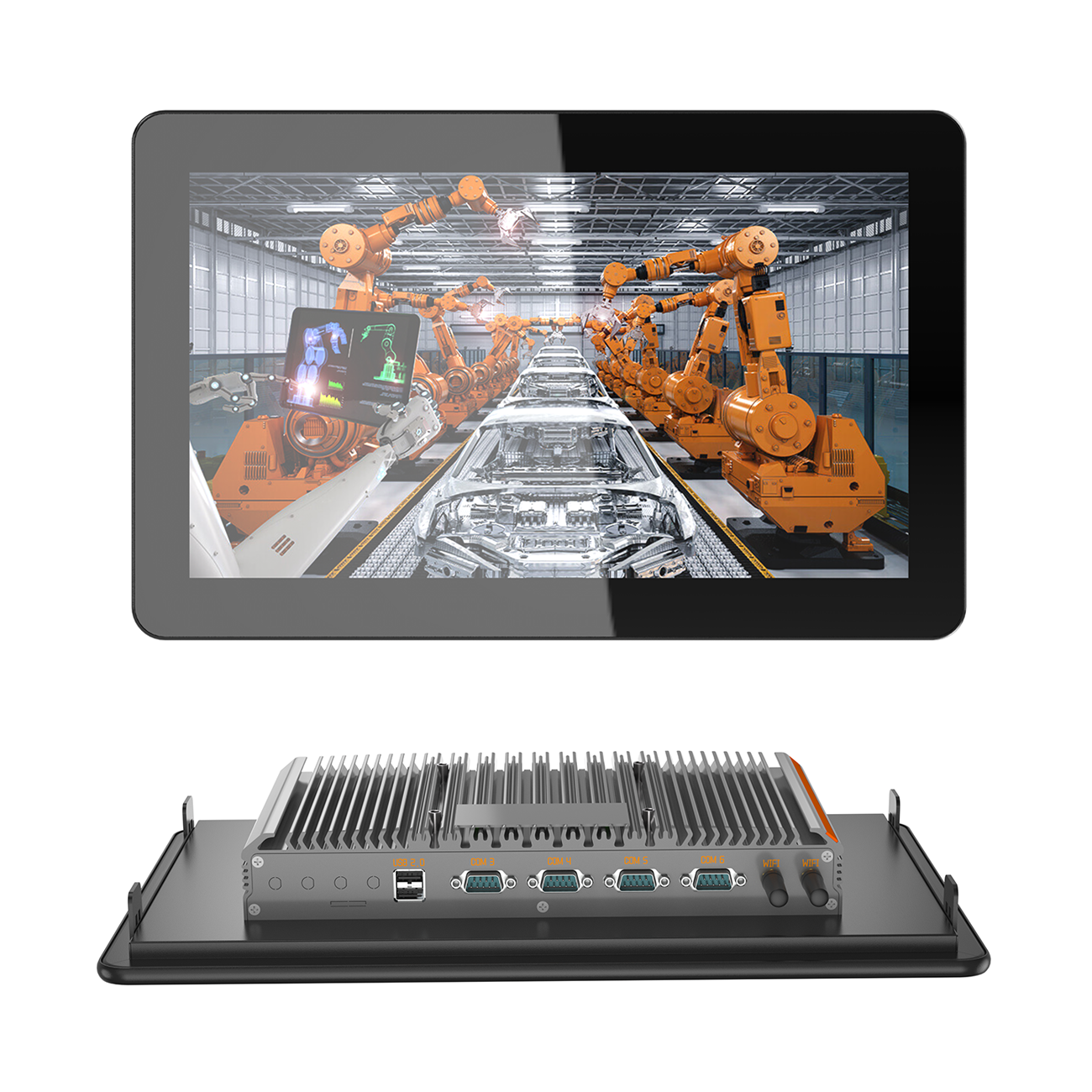
I/O (Input/Output) interfaces determine how the industrial tablet PC connects to your machines, sensors, networks, and peripherals. It's the metric most buyers under-specify — and the one that causes the most integration headaches.
Essential I/O Interfaces
1. Serial Ports (RS232 / RS485)
- The most important industrial I/O — used to connect to PLCs, sensors, instruments, scales, barcode scanners, and legacy equipment
- RS232: Short distance (15m), point-to-point, common for older equipment
- RS485: Long distance (1200m), multi-drop (up to 32 devices), common for industrial networks (Modbus RTU)
- Recommendation: Specify at least 1–2 serial ports, with configurable RS232/RS485. You will almost always need more than you think.
2. Ethernet
- Gigabit Ethernet for network connectivity, MES integration, remote access
- Dual LAN recommended for isolated networks (control network + monitoring/IT network)
- PoE (Power over Ethernet) option for installations where power wiring is difficult
3. USB
- For peripherals: barcode scanners, printers, keyboards, mice, USB drives
- Recommend 2–4 USB ports (mix of USB 2.0 and 3.0)
- Consider vertical vs. horizontal port orientation for cable routing in tight spaces
4. GPIO (General Purpose Input/Output)
- Digital inputs for sensors, switches, alarms
- Digital outputs for relays, indicator lights, buzzers
- Typically 4-in/4-out, configurable
- Essential for machines that need direct hardware control without a separate PLC
5. Wireless
- Wi-Fi (dual-band 2.4G/5G): Standard for wireless networking
- Bluetooth 4.2+: For peripherals (wireless scanners, headsets, beacons)
- 4G LTE (optional): For remote/mobile installations where wired network is unavailable
- GPS (optional): For vehicle/mobile tracking applications
6. Display Output (HDMI/VGA)
- For connecting a secondary monitor or large display
- Useful for control rooms or stations where a second screen is needed
Common I/O Pitfall
Under-specifying serial ports. Many buyers focus on CPU and display and order 1 serial port — then discover they need 2 (one for PLC, one for sensor network) after deployment. Adding a USB-to-serial adapter is a workaround, but it adds cost, complexity, and a potential failure point. Specify enough serial ports upfront.
Quick Selection Checklist
Before ordering, confirm:
CPU
- ARM or x86? (matches your software)
- Enough cores/clock for your application?
- Low enough TDP for fanless cooling?
- Long-term supply guaranteed?
Display
- Right size for application and viewing distance?
- Bright enough for the installation environment? (350 nits indoor, 1000+ nits outdoor)
- Right touch technology? (capacitive for most, resistive for thick gloves/extreme water)
- Full-lamination for outdoor/humid/vibration?
I/O
- Enough serial ports (RS232/RS485)?
- Ethernet (single or dual)?
- Enough USB ports?
- GPIO needed?
- Wireless (Wi-Fi/Bluetooth/4G)?
- Display output needed?
How Senke Covers All Three Metrics
Senke's industrial tablet PC lineup offers flexible configuration across all three metrics:
CPU Options
- ARM quad-core/octa-core (Android 11 / Linux) — low power, fast boot
- Intel Celeron / Core i3/i5 (Windows / Linux) — full software compatibility
- Dual-system (Windows + Android) on x86 platforms
Display Options
- 7" to 27" full size range
- 350 nits standard, 1000–1500 nits high-brightness (custom up to 2500 nits)
- PCAP 10-point capacitive multi-touch (gloved/wet-finger capable), resistive optional
- Full-lamination optical bonding available across all sizes
- AG/AF coating, anti-microbial (medical) options
I/O Options
- RS232/RS485 (configurable, 1–4 ports)
- Gigabit Ethernet (single or dual)
- USB 2.0/3.0 (2–6 ports)
- GPIO (4-in/4-out, configurable)
- HDMI output
- Dual-band Wi-Fi, Bluetooth 4.2
- Optional 4G LTE, GPS
- Custom I/O layouts available via OEM/ODM
All models feature fanless cooling, IP65 front panel, wide-temperature operation, solid-state storage, and 100,000+ hour MTBF — with comprehensive OEM/ODM customization and 7–10 year product lifecycle commitment.
Conclusion
Selecting an industrial tablet PC doesn't require comparing every spec in the catalog. Focus on the three metrics that matter most:
- CPU — match to your software ecosystem (ARM for Android/Linux dedicated HMI, x86 for Windows/legacy software), not raw GHz
- Display — match size to application, brightness to environment, touch to operator needs, and consider full-lamination for harsh conditions
- I/O — specify enough serial ports (the most common under-spec), Ethernet, USB, GPIO, and wireless for your integration needs
Get these three right, and you'll have an industrial tablet PC that delivers reliable performance for 7–10 years — without the integration headaches, failures, and costly upgrades that come from poor initial selection.
About Senke Senke is a trusted global provider of industrial display solutions, touch computers, and HMI systems. With a full lineup from 7" to 27" — offering flexible CPU (ARM/x86/dual-system), display (size/brightness/touch/bonding), and I/O (serial/Ethernet/USB/GPIO/wireless) configuration — Senke delivers industrial tablet PCs engineered for 24/7 operation with fanless cooling, IP65 protection, wide-temperature range, and 100,000+ hour MTBF. Comprehensive OEM/ODM customization and 7–10 year product lifecycle commitment ensure the right solution for every application.
Contact Senke International Sales Department Email: sales@senke.com Website: www.senke.com
New News
Embedded Industrial PC for Simple Integration
45
2026-10-16
High Protection Industrial Touch Panel PC
54
2026-10-15
Hot Products
Full Screen Digital Advertising Poster
Ultra-thin 4k
10 Inch Windows Rugged Tablet
Android 11,MT8788,4G,64G

Senke Electronic is a manufacture of industrial panel pc, industrial box pc, rugged tablet, kiosk payment and digital display advertising.